
 106
106  585
585  0
0 

Qu'est-ce que DiscordTools ?
DTools AI est un bot qui permet de lui confier la plupart des tâches liées à la modération des chats. Vous n'avez rien à configurer, il suffit d'activer le filtre d'auto-modération et le bot commencera à surveiller le serveur.
Bot : DTools#6555
ID du bot : 867466728556068894
La particularité du bot est qu'il permet de modérer les contenus indésirables, les propos grossiers, toxiques, insultants, etc. sans l'intervention des modérateurs (IA). Le bot gère efficacement les tentatives de contournement des filtres. Par exemple, en vérifiant les différents caractères dans le texte ou en vérifiant leur remplacement par d'autres caractères.
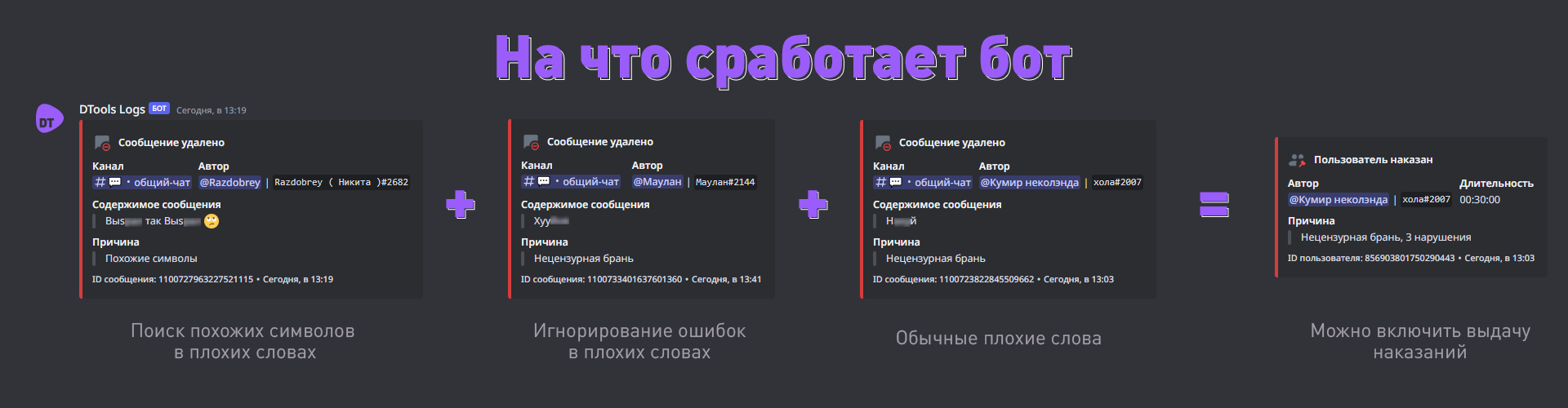
Utilisation du bot Tout est très simple.
Il existe deux options de configuration : via le bot et sur le site discordtools.cc. Dans le bot, vous ne pouvez définir que les paramètres de base pour que le bot fonctionne.
Examinons l'option avec le bot
- Ajoutez le bot au serveur ;
- Activez le module d'auto-modération à l'aide de la commande
/automod filter enable true; - Configurez le canal des journaux —
/automod log channel <canal>; - Configurez la langue du bot —
/lang set <langue>. La commande /lang affichera la langue actuellement utilisée ; - Tous les filtres sont activés automatiquement. Si vous n'avez pas besoin d'un filtre, par exemple Zalgo, vous pouvez le désactiver à l'aide de la commande /automod zalgo enable false. Les paramètres de chaque filtre, les droits d'accès, les mots exclus, etc. peuvent actuellement être configurés via le serveur d'assistance.
Pour voir la liste de toutes les commandes disponibles, utilisez la commande /help
Filtres
Filtre des mots grossiers — filtre principal qui supprime la plupart des contenus indésirables. Il supprime les jurons, les insultes, les propos toxiques, etc. Ne vous inquiétez pas, même si la liste est longue, il ne classera pas tout comme « jurons ». Je n'ai simplement pas trouvé d'autre nom pour désigner tout cela.
Le filtre des caractères similaires supprime tous les messages dans lesquels des lettres peuvent être remplacées par des lettres anglaises, par exemple. Le filtre ne fonctionnera pas nécessairement avec les jurons, il prend en compte ce type de comportement dans son ensemble, car il n'est pas utilisé dans la communication quotidienne. Si vous le désactivez, les utilisateurs pourront utiliser des mots grossiers en remplaçant les caractères.
Filtre de texte en majuscules — le filtre se déclenche pour tout texte superposé au texte original. Vous avez probablement déjà vu des lettres normales avec des traits au-dessus ou des lettres entourées de quelque chose. C'est ça. Si vous le désactivez, les utilisateurs pourront utiliser des mots grossiers avec des caractères similaires.
Filtre majuscules — supprime les messages contenant un grand nombre de caractères en majuscules. Par défaut, il se déclenche à partir de 3 caractères afin de permettre l'utilisation d'abréviations.
Chacun de ces filtres est associé à une sanction. Celle-ci est activée par défaut.






Commentaires